# Configuration

## Framework

You can change the Framework that you use on your server.

<figure><img src="https://2634281219-files.gitbook.io/~/files/v0/b/gitbook-x-prod.appspot.com/o/spaces%2F3q7Ez4pI4KOi4VpnbK14%2Fuploads%2FuF26JmiJ9Gf5woRxGcAP%2Fimage.png?alt=media&#x26;token=13699a7f-2bac-4e61-8a73-695a76f12207" alt=""><figcaption></figcaption></figure>

## Language

Set your language for the script.

<figure><img src="https://2634281219-files.gitbook.io/~/files/v0/b/gitbook-x-prod.appspot.com/o/spaces%2F3q7Ez4pI4KOi4VpnbK14%2Fuploads%2FJLAOT5kt0a4uvuVi9ujN%2Fimage.png?alt=media&#x26;token=acc63087-21ea-4d50-909c-a90a09eca028" alt=""><figcaption></figcaption></figure>

## Interaction

Here we have a choice of 4 types of interaction that are built in.

<figure><img src="https://2634281219-files.gitbook.io/~/files/v0/b/gitbook-x-prod.appspot.com/o/spaces%2F3q7Ez4pI4KOi4VpnbK14%2Fuploads%2FrosXFZg2Ujt46iWldo8W%2Fimage.png?alt=media&#x26;token=49c08f88-483c-4299-b0fd-bb997dc6059c" alt=""><figcaption></figcaption></figure>

If your interaction is **'drawtext'**, then the text is editable in the config.

<figure><img src="https://2634281219-files.gitbook.io/~/files/v0/b/gitbook-x-prod.appspot.com/o/spaces%2F3q7Ez4pI4KOi4VpnbK14%2Fuploads%2FPYIcrR0I9SsGb9ehGB6Q%2Fimage.png?alt=media&#x26;token=3c3d7914-eb37-41ca-9edb-10b1fb44accc" alt=""><figcaption></figcaption></figure>

If the interaction is setted to **'drawmarker'**, then you can also edit the Marker Options in the config.

<figure><img src="https://2634281219-files.gitbook.io/~/files/v0/b/gitbook-x-prod.appspot.com/o/spaces%2F3q7Ez4pI4KOi4VpnbK14%2Fuploads%2FddMRWhZGAycAwks8VNEV%2Fimage.png?alt=media&#x26;token=82305f0a-e79e-4544-b489-a5062c60e0b8" alt=""><figcaption></figcaption></figure>

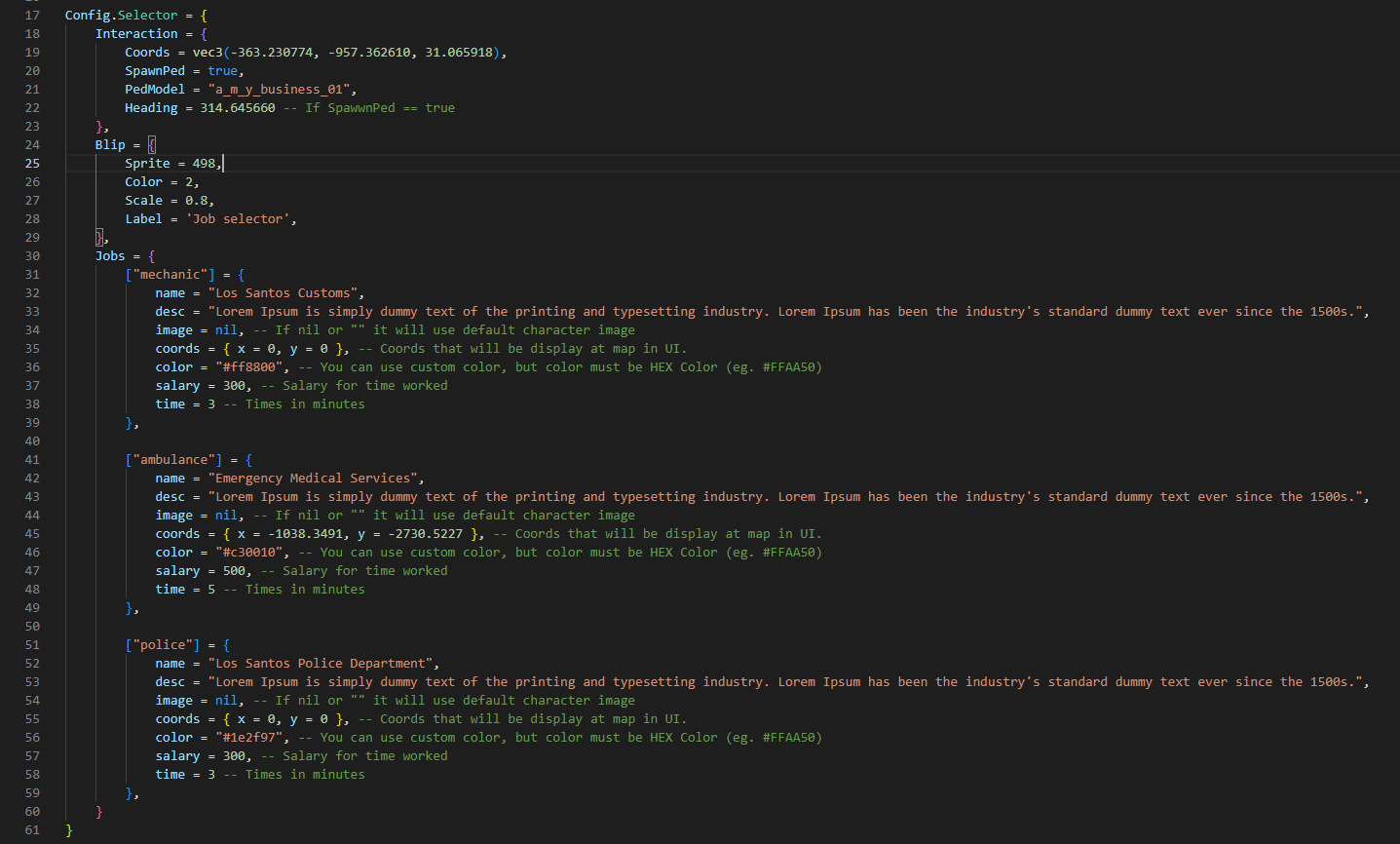
## Selector

Here you can configure the coords, ped, blip, jobs, job-images, job-color, job-salary and job-time.


<figure><img src="https://2634281219-files.gitbook.io/~/files/v0/b/gitbook-x-prod.appspot.com/o/spaces%2F3q7Ez4pI4KOi4VpnbK14%2Fuploads%2FUQtjoxOlO27zV7L91oTZ%2Fimage.png?alt=media&#x26;token=51a0c82d-83ae-4c02-8ec3-3f7baaaeab88" alt=""><figcaption></figcaption></figure>